A private personal finance app for your phone and computer
Private · Works offline · No subscription
Your money. Your device. Nobody else's business.
PryvitLedger shows you your balance on every day of the month — paychecks, bills, and debt payoff, computed entirely on your phone or computer. No account. No bank login. Your numbers stay on your device.
Works on iPhone, Android, and desktop. Installs from your browser in two taps. The only thing that can leave your device is the optional AI coach — details.
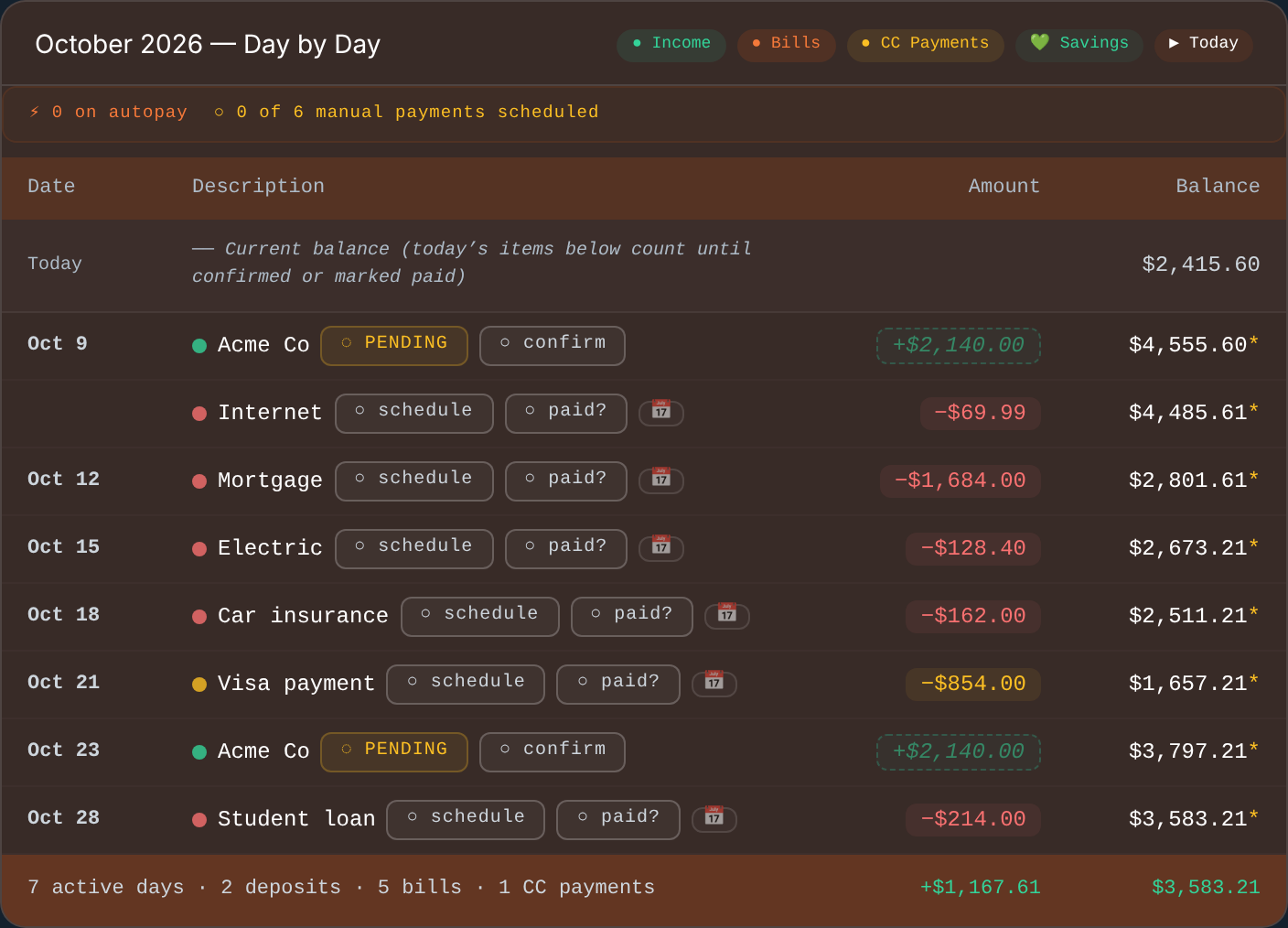
See your whole month, day by day
Real app screen · demo data · computed on-device
SEE IT WORK
Know before it happens.
A short look: an overdraft warning days before it happens, fixed by moving one bill, then a plan for paying off the cards with a payoff date for every one. Demo data only.
This is a planner, not a bank. Moving a bill in the app changes your plan, not your real bill. To make it work in real life: ask your biller to move the due date, or make sure you can pay after payday without a late fee. Then actually pay it on the new date.
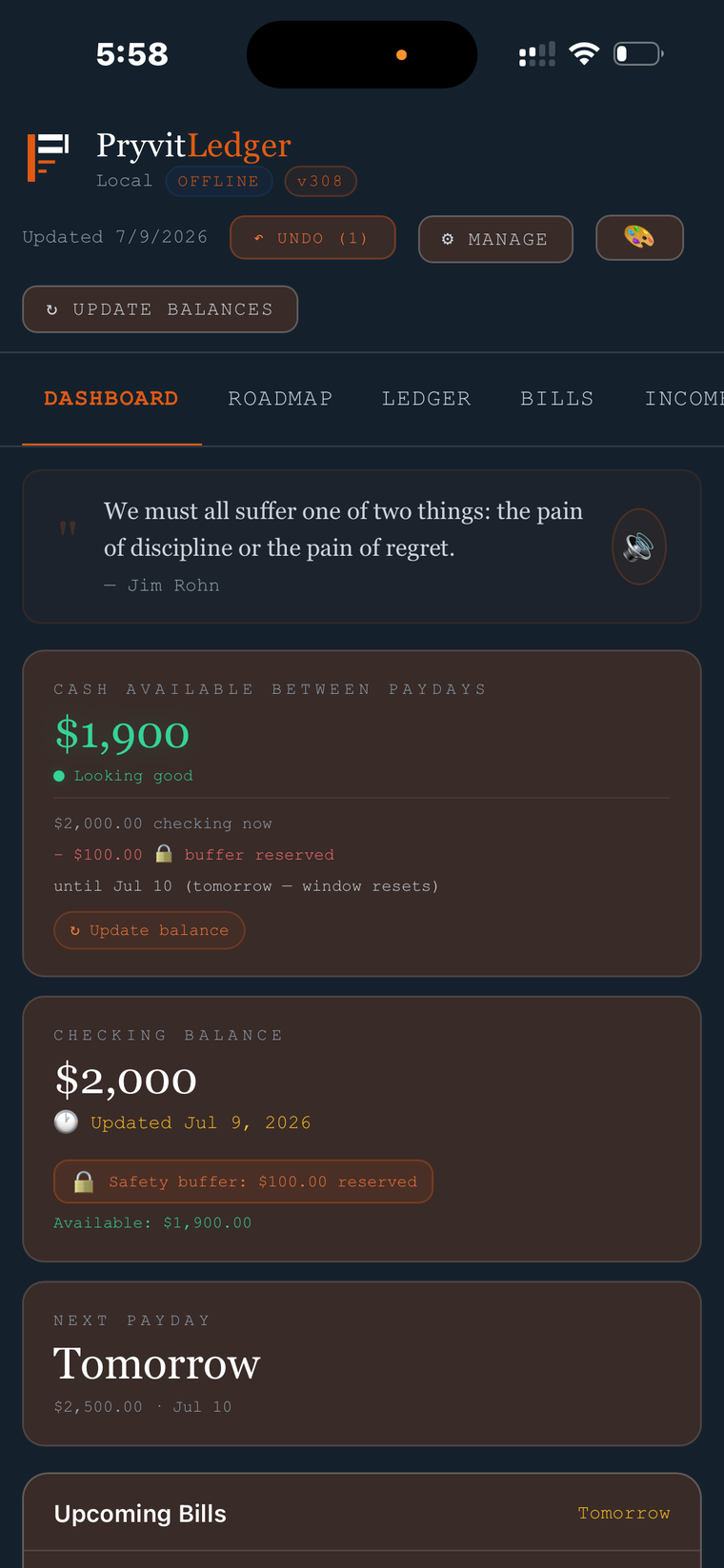
Cash available until paydayWhat is actually safe to spend after every bill that lands before your next paycheck.
Fix it before it happensSee the dip on the exact day, move one bill, and the overdraft is gone.
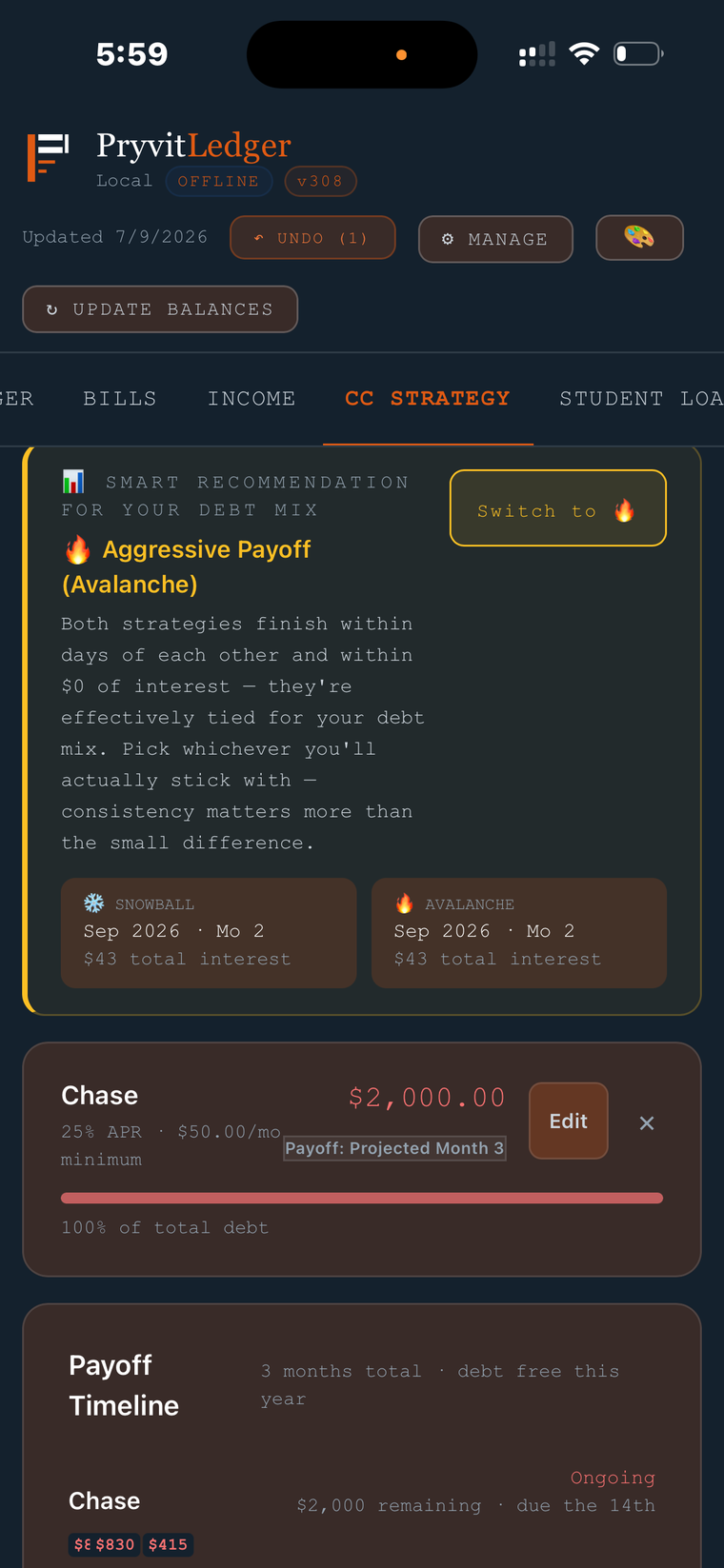
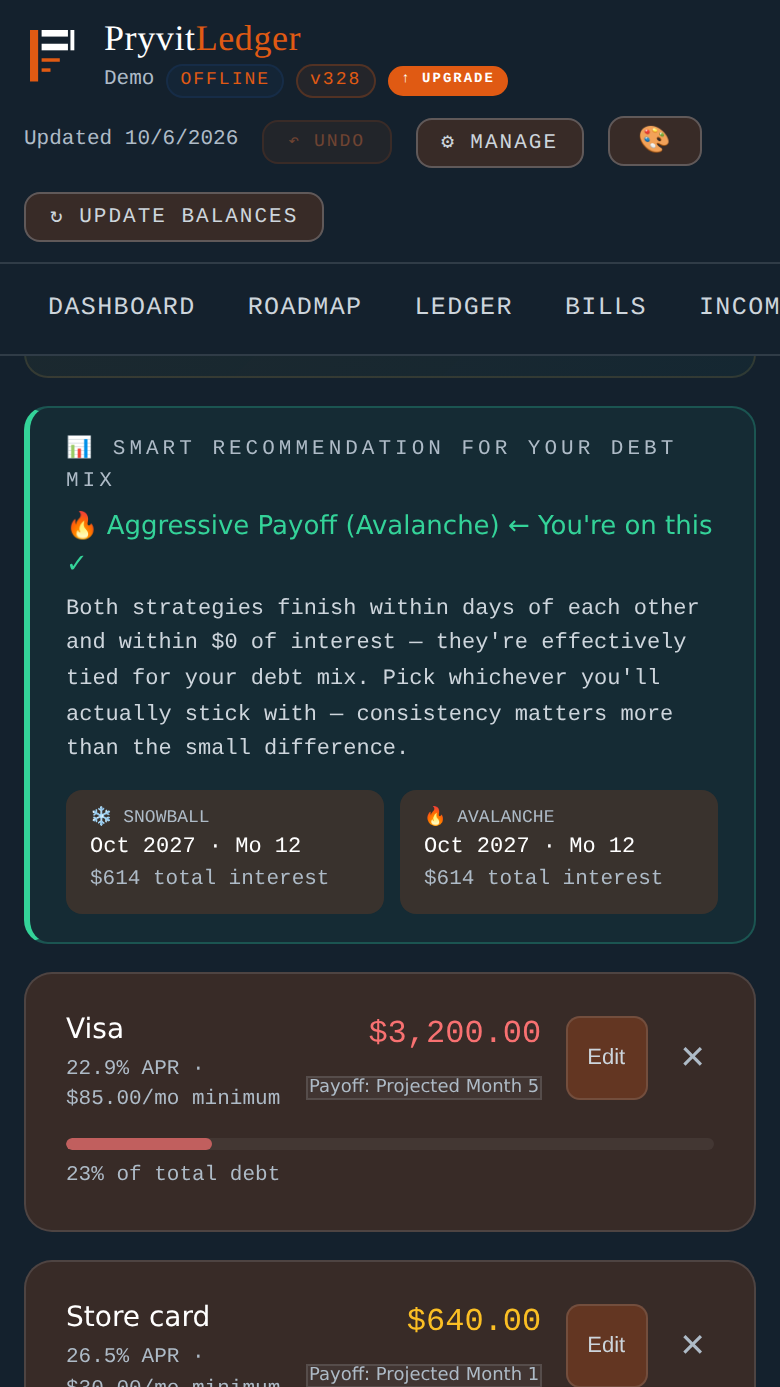
A payoff date for every cardCompare snowball, avalanche and more, with debt-free dates and total interest.
Read the narration
Will you overdraw before payday? PryvitLedger warns you days ahead, before the overdraft ever happens. Your dashboard shows the cash you can actually spend, until your next paycheck. The ledger shows every single day. See the dip, move one bill past payday, and the problem is gone. (Moving a date in the app changes your plan, not your bill: pay it on the new date, and ask your biller first.) Look at any month ahead, one click at a time. Then your credit cards. Pick a payoff strategy, compare every method side by side, and see a payoff date for every card. No bank login. No account. Your data stays on your device. Try it free at PryvitLedger dot com.
Narration is a computer-generated voice.
Free: this month and next. Pro ($39 once): all 12 months and the payoff-strategy comparison. No bank login, no account.
ENTRY 01 · PRIVACY
Budget apps watch you. This one can't.
Most finance apps ask you to hand over your bank login, then live on their servers. PryvitLedger is built the other way around.
Privacy
Your data stays on your device
There is no account to create and no server of ours holding your numbers. They live in your device's own storage, so we never see them. The one exception is the optional AI coach: if you add your own key and ask it a question, your device sends that question and a snapshot of your numbers straight to Anthropic, never through us. Leave it off and nothing is sent.
Clarity
See every single day, not a monthly guess
Category pie charts don't answer the real question: will I clear the mortgage on the 12th before payday on the 10th lands? The day-by-day ledger shows your projected balance on every date, flags your lowest point, and warns you before an overdraft — not after.
Ownership
No subscription. No hostage data.
The core app is free. Pro is a one-time $39 with no subscription — 12 months of new features are included, and everything you unlocked keeps working after that. Export your complete data as a file anytime and take it anywhere — it was always yours.
ENTRY 02 · THE LEDGER
Built around one question: what's actually safe to spend?
Not what's in the account today — what's left after everything between now and your next paycheck gets paid.
Between paydays
Cash available after bills
The ledger looks at every bill due before your next paycheck lands and shows the money that's genuinely yours to spend — not the misleading number on your bank's home screen.
balance 1,452.78 − bills due 812.00 = 640.78 safe
Day by day
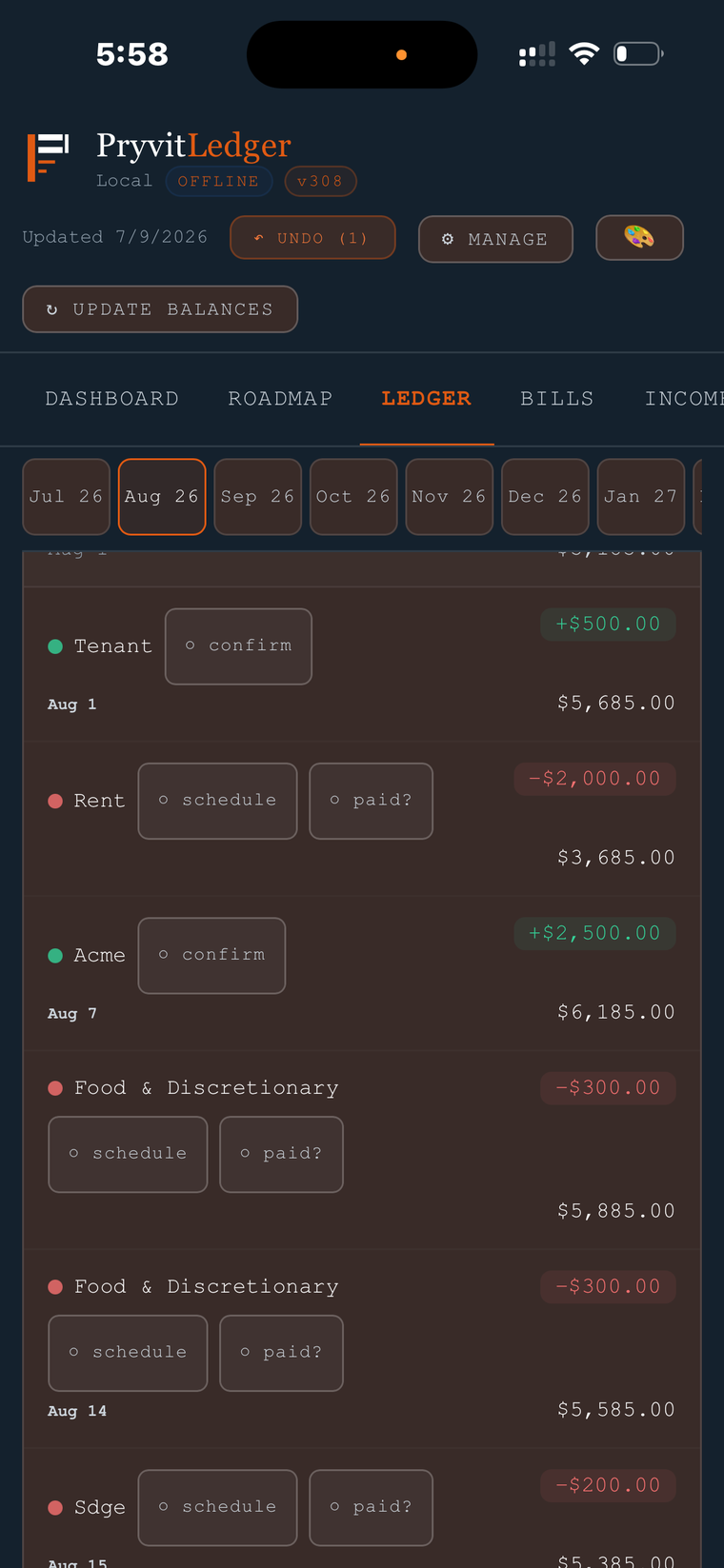
A running balance for every date
Every payday, every bill, every debt payment posted to its actual day. Your lowest point gets flagged and overdraft risk is called out before it happens — not after.
lowest point Jul 21 · no overdraft risk
Real life happens
Paid a bill early? Mark it paid.
One tap marks any bill paid ahead of schedule, and the entire ledger recalculates instantly — every projected balance downstream updates to match what actually happened.
Electric · Jul 15 → ✓ paid Jul 9
Income streams
Track every income source
Multiple jobs, side income, different pay schedules — each stream is tracked on its own. Got a raise or a schedule change? Update the stream and every future month reflects it.
paycheck 2,140 → 2,290 from Aug 1
ENTRY 03 · BUILT FOR REAL LIFE
Because your month never goes exactly to plan
Most budget tools assume every bill and paycheck lands exactly as planned. These are the features built for the weeks when they don't.
One month only
Change one month without changing the plan
Electric came in high? Moving a due date this month? Edit that single bill's amount or day for just this month — next month snaps back to normal, and every balance after it recalculates.
Electric · Oct → $161.20 this month only
What actually arrived
Got $180 instead of $200? Record the $180.
Tap any income amount and enter what really landed. If you'd already marked it received, your balance corrects itself by the difference — and undoing it reverses exactly what was applied.
Friend payback · $200 → $180 received
Money you've lent
Track who owes you
Log a loan — who, how much, how they're paying you back. Expected repayments show up in your ledger as income, a short payment pushes the end date out, and a progress bar shows what's left.
Alex · $130 received · $470 left
Debt, planned
See the payoff date before you commit
Enter your cards and pick a strategy — protect cash flow, balanced, snowball or avalanche. The app shows the month each card clears and the total interest, using your real paydays and bills.
avalanche · debt-free Oct 2027
Mortgage (Pro)
A mortgage balance that tracks itself
Link a loan to its monthly bill and the balance walks forward as payments post, anchored to the balance on your latest statement. Re-anchor when the next statement arrives.
statement balance → updates with each payment
Early warning
A safety buffer that looks ahead
Set an emergency buffer and the dashboard warns you about projected dips below it in the weeks ahead — not just where you are today.
buffer 300 · dip below on Oct 15 → heads up
ENTRY 04 · HOW IT COMPARES
Honest comparison with the subscription apps
These are facts about price and design, not opinions. The other apps are good at things PryvitLedger deliberately isn't — they're listed below.
PryvitLedger
YNAB
Monarch
Copilot
Rocket Money
Simplifi
Cost over 3 years
$39 one-time Pro; free tier too
$327 $109/yr
about $300 Core, $99.99/yr
$285 $95/yr
$252–$504 Premium $7–14/mo
about $210 $41.88 yr 1, then $83.88/yr
Free version or trial
Free tier, no expiry
34-day trial
7-day trial
1-month trial
Limited free tier
7-day trial
Account to sign up
None
Required
Required
Required
Required
Required
Automatic bank sync
No — you enter your numbers
Yes (select banks)
Yes
Yes
Yes
Yes
Where your data lives
On your device
Their servers
Their servers
Their servers
Their servers
Their servers
Syncs across devices
No — export/import
Yes
Yes
Yes
Yes
Yes
Prices as listed publicly on October 2, 2026, from the companies' own pricing pages where available (YNAB, Copilot) and from CNBC and The Penny Hoarder reviews (Rocket Money, Simplifi, Monarch). Three-year totals multiply the annual or monthly list price; promotions, taxes and plan changes aren't included. Simplifi's first-year price is a limited-time promotion. PryvitLedger Pro includes 12 months of new features; renewing after that is optional. Prices and features change — check each company before you decide. PryvitLedger is not affiliated with or endorsed by any company named here; names belong to their owners.
Where the others are better
They import your transactions automatically. PryvitLedger is manual entry.
They sync across your phone, tablet and computer. PryvitLedger keeps one copy per device.
Several support sharing with a partner or household.
Rocket Money can hunt subscriptions and negotiate bills for you.
Where PryvitLedger fits
You'd rather not hand over a bank login or create an account.
You want a day-by-day answer to "can I cover this before payday?"
You'd rather pay once than rent your budget every month.
You're fine entering numbers yourself — and want them to stay yours.
ENTRY 05 · SETUP
Running in five minutes
Open the app linkiPhone: open app.pryvitledger.com in Safari, tap Share, then Add to Home Screen. Android: open it in Chrome and tap Install when prompted (or menu → Install app).
Enter rough numbersYour balance, paycheck, bills, and any debts. Estimates are fine — you can refine everything later.
Read your monthThe ledger builds instantly: every payday, every bill, your balance on every date, and where the tight spots are.
ENTRY 06 · SCREENSHOTS
See it before you try it
Demo data shown. Once installed, the app works offline — airplane mode included.
Dashboard — what's safe to spend until payday
Ledger — a running balance on every date
Money you've lent — repayments flow into the ledger
Debt — payoff date and interest by strategy
Make it yours
Twelve themes — including one for every branch of service.
PryvitLedgerSlate & terracotta
SlateOcean blue
NoirStark contrast
ArmyOlive & tan
Marine CorpsScarlet & gold
NavyGold rope & cobalt
Air ForceAzure & silver
Space ForceDelta blue
Coast GuardRacing stripe orange
NatureSunrise over the pines
PeaceDove white & sky blue
FreedomRed, white & blue
ENTRY 07 · PRICING
Free to use. Pro when you want depth.
No trials, no time bombs. The free app has no expiry.
In your browser's local storage on your own device. We don't receive it, sync it, or back it up — there is no server of ours that holds it. You can verify this: the app works with the network switched off entirely. The only exception is the optional AI coach, explained below.
What happens if I lose my phone?
Because nothing is in a cloud, you are your own backup. The app exports your complete data as a single small file — save it to your files, drive, or email it to yourself. Restoring on a new device takes one import. We recommend exporting after any big update to your numbers.
Do phone and computer stay in sync?
No — by design there's no server to sync through. Each device holds its own copy. If you use both, pick one as your main and move data with export/import when needed.
How do I put it on my phone?
There is no App Store or Play Store step. Open app.pryvitledger.com in Safari (iPhone) or Chrome (Android), then add it to your home screen, and it opens like any other app. Two short videos show every tap: install on iPhone and install on Android.
What does the AI coach send, and to whom?
The coach is optional, Pro, and bring-your-own-key. It does nothing until you paste in your own Anthropic key. When you then ask it a question, your device sends that question plus a snapshot of your numbers — balances, bills, debts, paycheck, your name and employer if you entered them — directly to Anthropic, never through us. Anthropic handles it under its own terms. If you never add a key, nothing is ever sent and the app works fully offline.
Is Pro really one payment?
Yes — one payment, and the app plus everything your license unlocked works forever. Your $39 also covers every new Pro feature we ship in your first 12 months. After that you can optionally renew to get brand-new features, but nothing you own is ever taken away. Your key is tied to your email, verified on your device, and survives backups and new phones.
How do groceries, gas and everyday spending work?
Add a weekly line — say "Groceries & gas, $250, every Friday" — and it posts to your ledger on its day like any other bill, so it's already counted in your safe-to-spend number. Adjust it for one month if a week runs over.
Who makes PryvitLedger?
PryvitLedger is built and supported by one independent developer. Email hello@pryvitledger.com and you reach the person who writes the code.
What if Pro isn't for me?
Email hello@pryvitledger.com within 14 days of purchase and you'll get a refund, no interrogation.
WHO BUILT THIS
One person, building it in the open.
PryvitLedger is built and supported by Sean, a solo developer in California. I started it because I wanted to leave my Excel budget without handing my bank login to anyone. I use it every day for my own money.
It costs almost nothing to run, so there is no subscription, no ads and no selling your data. The free version never expires. If something is confusing or broken, email me and I will answer.